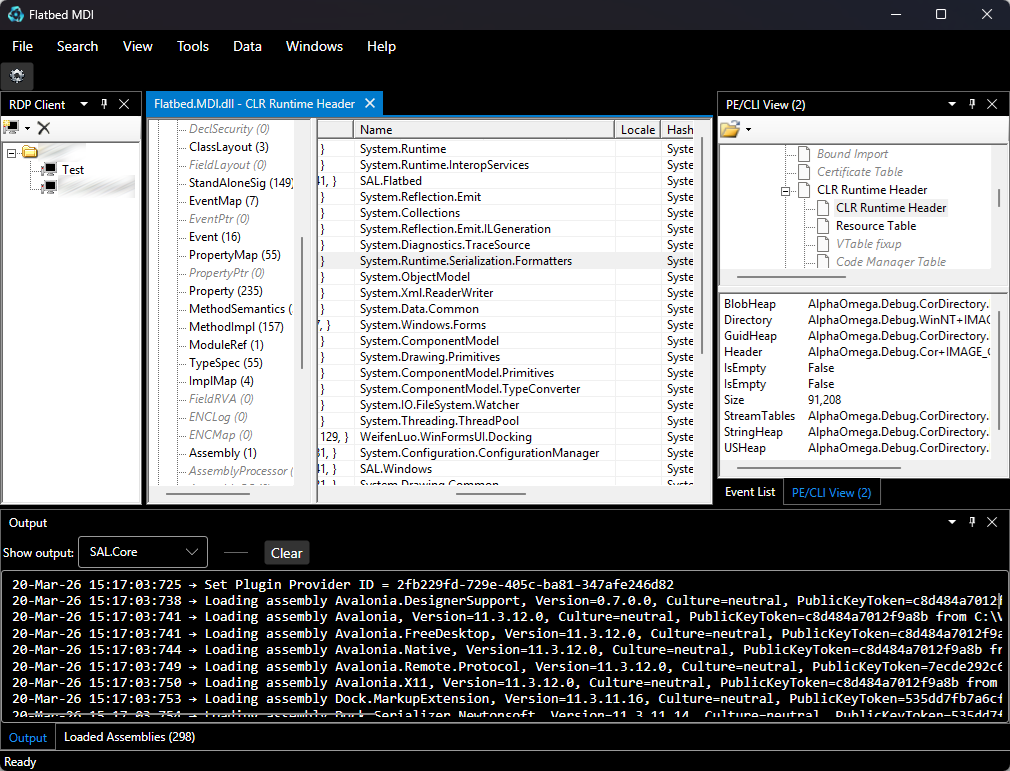
Flatbed.MDI.AvaloniaUI is a Windows desktop plugin host built with Avalonia UI, Dock.Avalonia, and SAL.Windows. It loads plugin assemblies from disk, lets the user choose a kernel plugin, and hosts plugin windows inside a dockable multi-document shell.
Overview
At startup, the host scans the plugin folder, loads available assemblies, selects an IPluginKernel, initializes settings providers, and then initializes the remaining plugins.
Features
Plugin host
- File-based plugin discovery from the application base directory.
- Kernel plugin selection through
SelectPluginDlgwhen multiple kernel plugins are available. - Persisted default kernel plugin selection.
- Session value cache exposed by the host.
- Cleanup of plugin-owned windows and menu items when a plugin is unloaded.
Docking UI
- Built on
Dock.Avalonia. - Uses a document dock plus dynamically created tool docks for side-hosted panels.
- Tool docks are created on demand for
Left,Right,Top, andBottomplacement hints. - Built-in utility panels open as tool windows:
Outputdefaults to the bottom side,Event Listdefaults to the left side.
- Layout serialization and restore across runs.
- Full dock tree restore from persisted layout state.
- Restore of visible, hidden, and pinned dockables, including side placement.
- User-driven docking layout is preserved across restarts instead of being remapped into fixed host areas.
- Stable
ContentIdgeneration for plugin windows, including persisted settings arguments when available.
Hosted content
Avaloniacontrols can be hosted directly.System.Windows.Forms.Controlinstances are wrapped and hosted throughWinFormsHost.- Built-in dockable utility windows:
OutputEvent List
Diagnostics
- Console output is redirected into the
Outputpanel. - Trace events are forwarded into the
Outputpanel. - Non-fatal exceptions are collected in the
Event Listpanel. - Error notifications are surfaced through in-window notifications.
User settings
- Main window size, position, and state are persisted.
- About dialog and plugin selection dialog sizes are persisted.
- Default kernel plugin is persisted.
- Options dialog stores authentication-related values and default kernel selection.
Target framework
.NET 8net8.0-windows
Runtime behavior
Startup flow
Program.csstarts theAvaloniadesktop lifetime.App.axaml.csregisters tracing and createsMainWindow.MainWindowloads persisted settings and creates built-in panels.HostMdiloads plugins from disk.- The kernel plugin is selected.
- Plugin settings providers are initialized.
- The dock layout is created and restored from disk.
Tray integration
The app defines a tray icon in App.axaml. The active kernel plugin can override the main window title, tray tooltip, and window icon through IKernelInfo.
Command line
/SAL_Kernel:PluginName- preselects the default kernel plugin.
Settings and persistence
Settings are stored under one of these locations:
- the current working directory if
Assembly.configexists there, - otherwise
%AppData%\Company\Kernel.
The effective Company and Kernel values are taken from configuration and can be updated from the selected kernel plugin.
Persisted files include:
<AssemblyName>.settings- application settings stored as JSON,<AssemblyName>.Forms.config- dock layout state.
Project structure
Flatbed.MDI.AvaloniaUI/Program.cs- application entry point.Flatbed.MDI.AvaloniaUI/App.axaml- global styles and tray icon definition.Flatbed.MDI.AvaloniaUI/App.axaml.cs- application bootstrap and tray commands.Flatbed.MDI.AvaloniaUI/MainWindow.axaml- main shell UI.Flatbed.MDI.AvaloniaUI/MainWindow.axaml.cs- plugin loading, menu handling, layout restore, and window persistence.Flatbed.MDI.AvaloniaUI/Plugins/HostMdi.cs- plugin lifecycle management and host services.Flatbed.MDI.AvaloniaUI/Windows/FlatbedDockFactory.cs- dock layout creation and layout restoration.Flatbed.MDI.AvaloniaUI/Windows/WindowControl.cs- adapter between dockables and plugin UI.Flatbed.MDI.AvaloniaUI/Dialogs/PanelOutput.axaml.cs- output viewer.Flatbed.MDI.AvaloniaUI/Dialogs/PanelEventList.axaml.cs- exception/event viewer.Flatbed.MDI.AvaloniaUI/Logging/HostTraceListener.cs- trace forwarding into the host UI.Flatbed.MDI.AvaloniaUI/Logging/ConsoleReader.cs- redirectsConsole.Outto the Output panel.SAL.Shared/- shared configuration, plugin provider, settings, and utility code linked into the app.
Plugin development
This host is built around abstractions from SAL.Flatbed and SAL.Windows.
Typical plugin integration points:
- implement
IPluginfor a standard plugin, - implement
IPluginKernelfor a kernel plugin, - implement
IKernelInfoto provide application name, icon, or logo metadata, - implement
IPluginSettingsfor windows that need persisted arguments, - use
IHostWindows,IWindows,IMenu, andIToolBarContainerto integrate with the host shell.
Drop plugin assemblies into the application base directory to make them available to the host.
Build
dotnet build .\Flatbed.MDI.AvaloniaUI\Flatbed.MDI.AvaloniaUI.csproj
Notes
- This is a Windows-only desktop host because it targets
net8.0-windowsand enablesWindowsFormsinterop. - The current implementation is an
Avalonia-based shell, not a WPF shell.